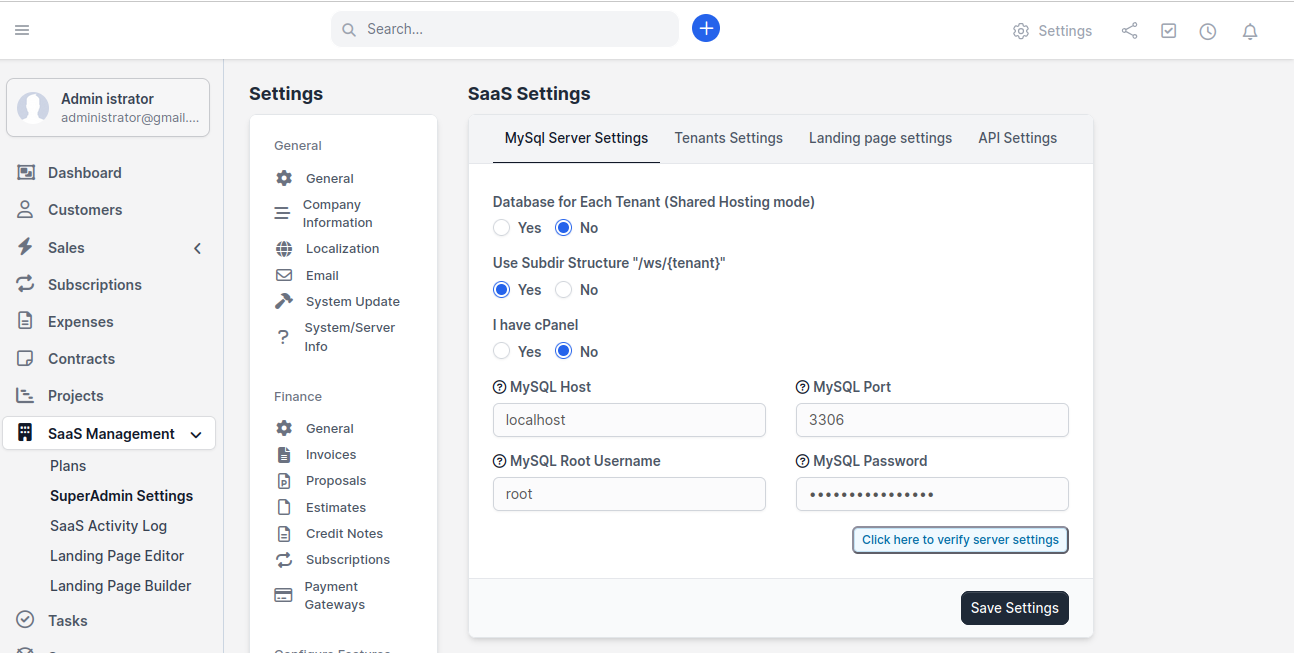
MySQL Server Settings

Configure how the module connects to MySQL and creates tenant databases. This is the foundation of your multi-tenant architecture.

The MySQL Server Settings tab is where you configure how tenant databases are created and managed. You already set this up during installation, but let's dive deeper into what each option means.

Accessing MySQL Server Settings

  1. Go to SaaS Management β†’ SuperAdmin Settings

  2. Click the MySQL Server Settings tab

MySQL Server Settings tab
MySQL Server Settings β€” the foundation of your multi-tenant architecture

Settings Explained

Database for Each Tenant (Shared Hosting Mode)

This is the most important architectural decision for your SaaS platform.

Option
What It Does
When to Use

Yes (Recommended)

Each tenant gets their own isolated MySQL database

Production use, data isolation, security-conscious deployments

No

All tenants share a single database with prefixed tables

Testing, development, or if your hosting limits database creation

Why "Yes" is recommended:

  • Data isolation β€” One tenant can never accidentally see another tenant's data

  • Easy backups β€” You can backup/restore individual tenants

  • Better performance β€” Smaller databases = faster queries

  • Easy cleanup β€” Deleting a tenant is as simple as dropping their database

triangle-exclamation

Use Subdir Structure "/ws/{tenant}"

Option
URL Format
Requires

Yes

yoursite.com/ws/tenant-name

No additional DNS setup

No

tenant-name.yoursite.com

Wildcard DNS + web server config

Choose based on your setup from the DNS Configuration guide.

I Have cPanel

Option
What Happens

Yes

Module uses cPanel API to create databases and accounts

No

Module uses direct MySQL commands (requires root/admin MySQL user)

MySQL Connection Details

Field
Description
Default

MySQL Host

The hostname of your MySQL server

localhost

MySQL Port

The port MySQL is running on

3306

MySQL Root Username

Username with CREATE DATABASE privilege

varies

MySQL Password

Password for the above username

varies

Verify Server Settings

Always click "Click here to verify server settings" after making changes. This tests:

  • Can the module connect to MySQL? βœ…

  • Does the user have CREATE DATABASE privilege? βœ…

  • Is the connection stable? βœ…

If verification fails, double-check your credentials and see Troubleshooting β†’ Installation Issues.


Best Practices

  1. Use a dedicated MySQL user β€” Don't use root in production. Create a specific user for the SaaS module.

  2. Use strong passwords β€” The MySQL password is stored in your server, so make it strong.

  3. Choose isolated databases β€” Unless you have a specific reason, always use separate databases per tenant.

  4. Verify after every change β€” Always click the verify button after changing any MySQL setting.

circle-check

Last updated